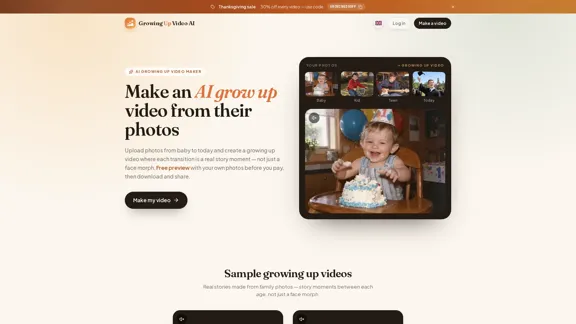
Growing Up Video AI is an AI-powered video maker that transforms personal photos into a short, animated growing-up video. Users can upload photos ranging from baby pictures to the present day, arrange them chronologically, and let AI create transitions that represent meaningful moments between different ages. Unlike traditional photo slideshows or face-morph applications, the platform focuses on creating short story-like scenes. It offers a free preview before payment, customizable transitions, original AI-generated soundtracks, and downloadable HD videos. The tool is designed for milestone birthdays, graduations, weddings, anniversaries, memorials, and pet memories.
Growing Up AI Video Maker - Create Keepsake Videos from Photos
将宝宝的照片制作成温馨的成长视频,在每个年龄阶段记录特别的故事瞬间。使用您自己的照片即可在线免费预览视频,随后解锁高清版本,尽情欣赏并分享这些珍贵回忆。
Video
Nov 4, 2026
Visit Website
Growing Up AI Video Maker Introduction
Growing Up AI Video Maker Features
-
AI Growing Up Video Generation
Growing Up Video AI turns a collection of photos into a continuous visual story. It analyzes pairs of images and generates a five-second animated transition for each pair, creating the impression of someone growing through different stages of life.
-
Customizable Photo Sequence
Users can upload between 2 and 30 photos and arrange them in chronological order using a drag-and-drop interface. This allows users to control the video's timeline and highlight important moments.
-
AI-Generated Story Moments
Rather than simply blending faces, the platform creates short scenes connecting different ages. Users can review the proposed moments and rewrite descriptions to adjust the intended actions before rendering.
-
Free Preview Before Payment
Users can watch the first transition for free using their own photos. This provides an opportunity to evaluate the visual quality before purchasing the complete video.
-
Transition Redos
If a generated scene does not meet expectations, users can select a transition, describe the desired changes, and generate it again. The platform includes free redos, while failed rendering attempts are retried without additional charges.
-
Original AI Soundtrack
Each paid video includes an AI-generated instrumental soundtrack designed to match the video's duration. Users can choose from different musical styles, including warm piano, cinematic strings, lullaby, and upbeat pop. Uploading a personal song is also supported.
-
Multiple Video Aspect Ratios
The platform supports five video formats:
- 16:9 for televisions and projectors
- 4:3 for traditional camera photos
- 1:1 for Instagram
- 3:4 for portrait-oriented content
- 9:16 for TikTok, Reels, and Stories
-
HD Download and Sharing
After payment, users can download the finished video as an MP4 without a watermark or share it through a private browser link. Completed videos remain available for 14 days.
-
Multiple Use Cases
Growing Up Video AI supports videos featuring individuals, couples, and pets. Common applications include milestone birthdays, graduation celebrations, wedding receptions, anniversaries, memorials, and first-year baby videos.
-
Photo Privacy Protection
According to the website, uploaded photos are used only to create videos and are not shared or used to train AI models. Users can also delete their projects at any time.
Growing Up AI Video Maker How to Use?
-
Prepare between 10 and 12 photos covering different stages of life for a balanced growing-up video.
-
Select clear, front-facing photos to help the AI maintain recognizable facial features throughout the transitions.
-
Arrange photos chronologically, starting with the youngest age and ending with the most recent picture.
-
When using old printed photographs, scan them or photograph them flat in good lighting. Avoid glare and crop unnecessary borders.
-
Choose photos featuring different locations and activities to give the AI more visual context for generating story moments.
-
For group photographs, crop the image to focus on the main person featured in the video.
-
Review the AI-generated transition descriptions before rendering. Rewrite any scenes that do not reflect the intended story.
-
Select the appropriate aspect ratio before uploading photos. Landscape formats work well for birthday parties and projectors, while vertical formats are better suited to TikTok and Instagram Reels.
-
Watch the free preview before purchasing the complete video to assess whether the generated transitions meet your expectations.
-
Download the finished MP4 within 14 days because completed videos and their associated clips and sharing links are permanently deleted afterward.
Growing Up AI Video Maker Q&A
What is Growing Up Video AI?
Growing Up Video AI is an online AI video maker that transforms photos from different stages of someone's life into an animated growing-up story. It creates short scenes between photographs instead of relying solely on traditional slideshows or face morphing.
How many photos can I upload?
Users can upload a minimum of 2 and a maximum of 30 photos. Approximately 10 to 12 photos are recommended for covering an entire childhood and creating a video of around one minute.
Can I preview my video before paying?
Yes. Each account receives a free preview of the first transition using its own uploaded photos. Users can evaluate the result before unlocking the complete video.
How much does a growing-up video cost?
The website offers several one-time payment plans based on the number of photos. Prices range from $3.90 for the Short plan to $44.90 for the Legacy plan. A promotional Thanksgiving discount of 30% is also advertised.
Does Growing Up Video AI require a subscription?
No. The platform uses a one-time payment model for each video. There is no recurring subscription to cancel.
Can I customize the generated transitions?
Yes. Users can arrange their photos, review the AI-generated story moments, and rewrite scene descriptions. They can also request free transition redos if a result does not look right.
Can I add my own music?
Yes. Users can upload a personal song instead of using the original AI-generated instrumental soundtrack included with paid videos. The platform also offers several soundtrack styles to choose from.
Does the tool support old printed photographs?
Yes. Users can scan old photographs or take pictures of printed copies using a phone. The website recommends flat positioning, good lighting, minimal glare, and cropping to improve results.
Can I create growing-up videos for pets and couples?
Yes. The platform supports individual videos, couples growing up together, and pets progressing from puppy or kitten to adulthood.
How long does video generation take?
According to the website, generating the story takes approximately 20 seconds. Once the video is unlocked, transitions are rendered simultaneously, which usually takes a few minutes.
Can I download and share my completed video?
Yes. Users can download the finished video in MP4 format or share a private link that allows family members to watch it in a browser.
How long are completed videos stored?
Videos are stored for 14 days after creation. After that period, the video, clips, and associated sharing link are permanently deleted. Users should download their files before the retention period expires.
Growing Up AI Video Maker Price
Growing Up Video AI offers a free preview and several one-time payment plans. The listed prices are based on the number of photos included in the finished video.
| Plan | Photo Limit | Approximate Duration | Listed Price |
|---|---|---|---|
| Short | Up to 4 | 15 seconds | $3.90 |
| Story | Up to 12 | 55 seconds | $17.90 |
| Highlight | Up to 18 | 85 seconds | $26.90 |
| Full Life | Up to 24 | 115 seconds | $35.90 |
| Legacy | Up to 30 | 145 seconds | $44.90 |
Free preview: Users can upload and arrange photos, edit AI story moments, and preview the first transition without payment. Full HD downloads require unlocking a paid plan.
Promotional offer: The website advertises a 30% Thanksgiving discount using the code GROWING30OFF, with an advertised expiration date of December 2. The promotional price displayed for the Short plan is $2.73 instead of $3.90.
All plans use one-time payments rather than subscriptions. Users should confirm the final price and promotional availability at checkout.
* Prices are for reference only. Please refer to the official latest data for actual prices.
Growing Up AI Video Maker Evaluation
-
Accessible video creation: Growing Up Video AI makes it relatively straightforward to create personalized life-story videos without traditional video editing skills. Its photo-based workflow is suitable for families and casual users.
-
More engaging than conventional slideshows: The focus on animated story moments gives the platform a distinct approach compared with basic photo transitions and face-morph applications. This can make birthday, graduation, and wedding videos more personal.
-
Useful customization options: Chronological photo arrangement, editable scene descriptions, transition redos, multiple aspect ratios, and soundtrack choices provide meaningful creative control.
-
Low-risk preview experience: Allowing users to test the first transition before purchasing is a practical advantage. It helps users judge the AI's ability to work with their actual photographs rather than relying entirely on promotional examples.
-
Transparent payment structure: The one-time payment model and clearly listed photo limits make the pricing relatively easy to understand. Multiple plans accommodate different video lengths and occasions.
-
Limitations in AI consistency: Automatically generated scenes may not always reproduce the intended actions or preserve visual details perfectly. Users should review transitions carefully and use the included redos when necessary.
-
Short storage period: The 14-day retention policy requires users to download their videos promptly. This may be inconvenient for people who expect long-term online storage or want to revisit their projects later.
-
Limited information about technical output: Although HD downloads are advertised, the website does not provide detailed specifications about resolution, frame rate, or supported export settings. Users with specific production requirements may need further clarification.
Overall, Growing Up Video AI is a practical tool for turning personal photographs into animated life-story videos. Its combination of AI-generated transitions, customizable scenes, original soundtracks, and free previews makes it particularly suitable for personal celebrations and family keepsakes. However, the quality of the final result depends on the uploaded photos and the consistency of AI-generated scenes. Users should take advantage of the free preview before purchasing a complete video.
Related Websites
Check Details
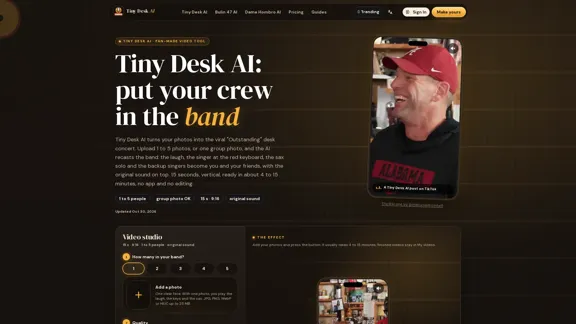
Tiny Desk AI Video Generator - Your Friends Sing Amazing
Tiny Desk AI Video Generator - Your Friends Sing AmazingCreate a fun Tiny Desk AI video using just 1 to 5 photos or a single group shot. Imagine the laughter as your friends grab the keys and saxophone, all ready for an original soundtrack. Enjoy a free 2-second preview before jumping into the full 15 seconds of joy!
--

Check Details
AI Avatar & UGC Video Generator | AI Ad Generator - UGCVideo.ai
AI Avatar & UGC Video Generator | AI Ad Generator - UGCVideo.aiCreate realistic AI Avatars and viral UGC Videos in minutes. Turn product URLs into high-converting ads for TikTok & FB with our AI Ad Generator. Features AI Influencers, Lip-Sync, and Script-to-Video tools.
--
Check Details
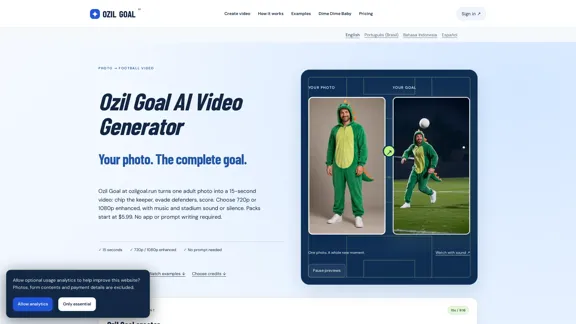
Ozil Goal AI Video Generator — One Photo, 15 Seconds
Ozil Goal AI Video Generator — One Photo, 15 SecondsOzil Goal AI video generator: turn one photo into a 15-second goal. Choose 720p or 1080p enhanced, original music or silence. Credit packs start at $5.99.
--

Check Details
Motion Control AI - Free AI Motion Transfer and Animation Creator
Motion Control AI - Free AI Motion Transfer and Animation CreatorDiscover the power of AI motion transfer and animation generation with Motion Control AI. Effortlessly animate any image using our innovative motion control technology, allowing you to transfer motion based on a single prompt. Best of all, you can get started for free!
--

Check Details
Describe Image & Picture - AI Image Description, Markdown, and Text Converter
Describe Image & Picture - AI Image Description, Markdown, and Text ConverterDiscover the power of AI with Image Describer, where you can effortlessly generate image descriptions and connect with visuals like never before. Dive in and explore new insights today!
--

Check Details
AI Face Swap - Easily exchange faces in HD videos and photos online at no cost.
AI Face Swap - Easily exchange faces in HD videos and photos online at no cost.With Supawork, you can easily swap faces in high-definition videos and photos without any hassle. Enjoy the freedom of unlimited AI video face swap technology, allowing you to replace faces in just seconds—all for free and without the need to sign up.
1.31 M

Check Details
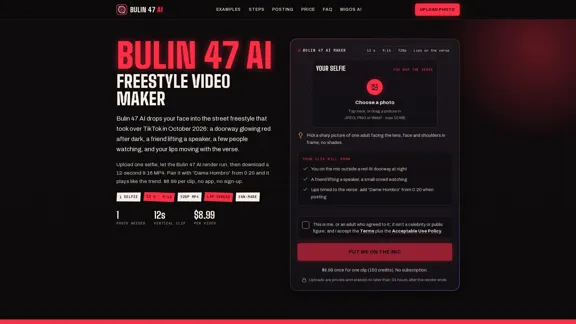
Bulin 47 AI - A Star in the Viral Dembow Freestyle
Bulin 47 AI - A Star in the Viral Dembow FreestyleBulin 47 AI transforms your selfie into a fun 12-second vertical video of you rapping along to the catchy dembow freestyle, perfectly lip-synced to the verse. It's just $8.99, and there's no app needed!
--