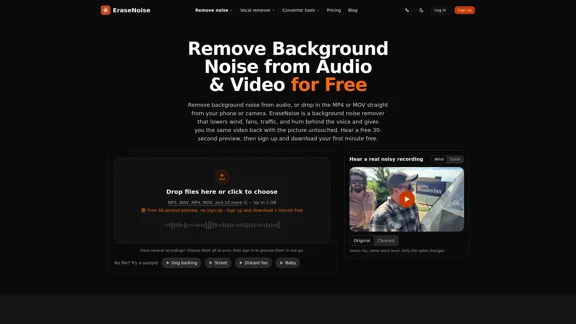
EraseNoise is an online AI background noise remover designed to clean audio and video recordings without requiring desktop software. Users can upload audio files or videos, preview the noise reduction results for free, and download the cleaned version if the output meets their expectations. The tool focuses on reducing background sounds such as wind, traffic, fan noise, air conditioning, electrical hum, and microphone hiss while preserving the original voice. With direct video processing, adjustable noise reduction strength, WAV audio exports, and browser-based access, EraseNoise is suitable for podcasters, YouTubers, journalists, educators, video editors, and anyone working with noisy recordings.
Remove background noise from audio and video - Free online background noise remover.
Easily remove background noise from your audio and video files online. Simply upload your MP4 or MOV file, listen to a free 30-second preview, and get your video back with the visuals preserved.
Voice
Nov 2, 2026
Visit Website
EraseNoise Introduction
EraseNoise Features
-
AI Background Noise Removal
EraseNoise reduces unwanted background noise behind speech, including wind, fans, air conditioning, traffic, electrical hum, static, and other environmental sounds. It aims to improve voice clarity while maintaining a natural-sounding recording.
-
Direct Audio and Video Processing
Users can upload audio files or video recordings directly without extracting the soundtrack first. Supported video formats include MP4, MOV, M4V, and WebM. The maximum upload size is 2 GB.
-
Free 30-Second Audio Preview
Every upload includes a free 30-second preview with original and cleaned versions. Users can switch between the two to evaluate the noise reduction quality before paying for full processing. The service offers three daily previews without an account and 20 with an account.
-
Adjustable Noise Reduction Strength
Users can control the noise reduction intensity to balance background noise removal and voice naturalness. This helps avoid excessive processing that can make speakers sound hollow or robotic.
-
Preserved Video Quality
EraseNoise replaces the video soundtrack while keeping the original picture unchanged for supported H.264 and HEVC footage. This eliminates the need to export, clean, re-import, and manually synchronize audio in a separate editor.
-
48 kHz WAV Audio Export
Users can download cleaned audio as a 48 kHz WAV file. The exported audio maintains the original clip's duration and starts at 00:00 unless trimmed, making it convenient to import into Premiere Pro, DaVinci Resolve, or CapCut.
-
Multiple Audio Formats
Supported audio uploads include MP3, WAV, M4A, AAC, OGG, Opus, and FLAC. Cleaned audio is delivered in WAV format, while processed videos are downloaded as MP4.
-
Batch Processing and Minute Packs
Users can select multiple recordings for processing in one session. The pay-as-you-go system allows customers to purchase processing minutes in advance, and unused minutes never expire.
-
Automatic File Deletion
Uploaded files and processed results are automatically deleted 24 hours after upload. This provides a defined file-retention period, although users should avoid uploading recordings they cannot leave on the service during that time.
-
Free Silence Removal
EraseNoise also provides a separate silence removal tool that runs directly in the browser. Users can shorten long pauses without using their paid noise-removal processing minutes.
EraseNoise How to Use?
-
Visit the EraseNoise website using a desktop or mobile browser.
-
Upload an audio recording or video file by dragging it into the upload area or selecting it from your device.
-
Wait for the tool to process the file and generate the free 30-second preview.
-
Switch between the original and cleaned versions to compare voice clarity and background noise reduction.
-
Adjust the noise reduction strength if necessary. Avoid using excessive reduction if it makes the speaker's voice sound unnatural.
-
If you are satisfied with the preview, create an account to access your first free minute of full downloads.
-
Select the desired output format. Choose WAV if you plan to edit the audio separately, or download the processed MP4 if you want the cleaned video.
-
For video editing, place the exported 48 kHz WAV file at the beginning of your timeline and mute the original soundtrack.
-
If you regularly process recordings, consider purchasing a minute pack or subscribing to Pro according to your monthly workload.
EraseNoise Q&A
What is EraseNoise?
EraseNoise is an online background noise removal tool that uses AI to reduce unwanted sounds in audio and video recordings. It is designed to improve speech clarity by lowering environmental noise such as wind, traffic, fans, and air conditioning.
Is EraseNoise free to use?
EraseNoise offers free 30-second previews, with three previews per day without an account and 20 per day with an account. New accounts also receive one free minute of full downloads. Files up to 30 seconds can be downloaded for free, up to 10 times daily. Longer recordings require paid processing minutes or a Pro subscription.
Can EraseNoise remove background noise from videos?
Yes. Users can upload MP4, MOV, M4V, and WebM videos directly, with a maximum file size of 2 GB. EraseNoise cleans the soundtrack and returns the video with the processed audio, eliminating the need to extract and manually synchronize the soundtrack.
What types of background noise can EraseNoise remove?
EraseNoise is designed to reduce wind, fan noise, air conditioning, traffic, electrical hum, microphone hiss, and other steady environmental sounds. It has also been tested on recordings containing dog barking, breathing, baby sounds, and kitchen noise. However, overlapping speech and keyboard clicks occurring directly over spoken words can be more difficult to remove.
Which audio and video formats are supported?
Audio uploads support MP3, WAV, M4A, AAC, OGG, Opus, and FLAC. Video uploads support MP4, MOV, M4V, and WebM. Cleaned audio is exported as WAV, while processed video is delivered as MP4.
Does EraseNoise preserve the original video quality?
For supported H.264 and HEVC footage, EraseNoise copies the original video picture without re-encoding it, replacing only the soundtrack. WebM and other codecs that cannot be contained in MP4 may require conversion to H.264.
Can I use EraseNoise for podcast production?
Yes. EraseNoise is suitable for cleaning podcast recordings, particularly remote interviews recorded in noisy environments. Users can adjust the reduction strength to preserve natural room ambience and export 48 kHz WAV files for further editing.
Does EraseNoise support multiple audio tracks?
Not fully. A video containing several audio tracks has only one track cleaned. Mono and stereo recordings retain their respective channel configurations, while files with more than two channels are returned as stereo. Separate multitrack processing is listed as a future feature.
Is EraseNoise suitable for removing music from recordings?
EraseNoise is primarily designed to reduce background noise behind speech, not separate music from vocals. Users who want to lower background music or isolate vocals should use the dedicated background music removal or vocal removal tools instead.
How long are uploaded files stored?
EraseNoise automatically deletes uploaded files and their processed results 24 hours after upload. Files are not retained as public demonstration recordings.
EraseNoise Price
EraseNoise offers a free plan, a monthly or yearly Pro subscription, and pay-as-you-go processing minute packs.
| Plan | Price | Included Features |
|---|---|---|
| Free | $0 | Free 30-second previews, one free minute of full downloads after registration, up to 10 free downloads daily for files of 30 seconds or less, unlimited silence removal |
| Pro Monthly | $9.99/month | 20 hours of monthly processing, audio and video support, noise and echo removal |
| Pro Yearly | $95.88/year ($7.99/month) | 20 hours of monthly processing, audio and video support, noise and echo removal |
| 1 Hour Pack | $4.99 | 60 minutes of processing, unused minutes never expire |
| 10 Hour Pack | $14.99 | 600 minutes of processing, unused minutes never expire |
The free plan is suitable for occasional testing, while minute packs offer flexibility for users with irregular workloads. Pro is designed for creators and professionals who process recordings regularly. Processing time is rounded up to the next whole minute.
* Prices are for reference only. Please refer to the official latest data for actual prices.
EraseNoise Evaluation
-
Simple and efficient workflow: EraseNoise makes background noise removal accessible through a straightforward upload-and-preview process. Users do not need to learn complicated audio editing software or create noise profiles before getting started.
-
Useful direct video processing: The ability to upload MP4 and MOV files directly is a practical advantage. Returning the cleaned video without re-encoding supported H.264 and HEVC footage also helps preserve the original picture quality and reduces editing steps.
-
Transparent preview system: The free 30-second preview is one of the platform's strongest features. Users can evaluate the actual results on their own recordings before purchasing processing minutes, reducing the uncertainty associated with AI audio enhancement tools.
-
Promising noise reduction performance: EraseNoise reports results from 24 real recordings in the Microsoft DNS Challenge. The average background score improved from 2.45 to 4.13 out of 5, while overall quality increased from 2.14 to 3.18. These results provide useful evidence of its noise reduction capabilities, although performance will vary depending on recording conditions.
-
Flexible pricing: The combination of subscriptions and non-expiring processing minute packs accommodates different usage patterns. Users who only occasionally clean recordings do not need to maintain a monthly subscription.
-
Limitations with complex audio: EraseNoise is most suitable for steady background noise behind speech. Overlapping voices, keyboard clicks occurring during speech, and heavily distorted recordings remain challenging. It is also not designed for vocal separation or comprehensive multitrack editing.
-
Features still under development: Batch processing improvements, multitrack support, original MOV output, transcripts, and podcast loudness presets are listed as upcoming features. Users who depend on these capabilities may need additional software.
-
Privacy considerations: Automatic deletion after 24 hours provides a clear retention policy, but users handling confidential recordings should consider this processing and storage window before uploading files.
Overall, EraseNoise is a practical online background noise remover for content creators, podcasters, educators, journalists, and video editors who want to improve speech clarity without complicated editing workflows. Its direct video processing, adjustable noise reduction, free previews, and flexible pricing make it worth considering. However, users requiring advanced audio restoration, precise manual editing, or comprehensive multitrack processing may still prefer dedicated desktop software.
Related Websites

Check Details
Transform your videos effortlessly with our AI-powered audio synthesis tool. Instantly generate high-quality soundtracks that are perfectly synchronized, and enjoy the flexibility of multiple formats. Plus, with unlimited usage, the possibilities are endless!
10.56 K

Check Details
AI Voice Cleaner - Free Background Noise Removal with One Click
AI Voice Cleaner - Free Background Noise Removal with One ClickEasily eliminate unwanted background noise from your audio or video and enjoy studio-quality sound with our user-friendly AI Voice Cleaner online.
34.39 K

Check Details
Free AI Music Generator: Create Songs Online | SongLoom
Free AI Music Generator: Create Songs Online | SongLoomCreate original songs, lyrics, and instrumentals from text with SongLoom's free AI music generator. Start online with free credits—no music skills needed.
--

Check Details
Gemini Music Generator - Instantly create songs with Gemini Music AI.
Gemini Music Generator - Instantly create songs with Gemini Music AI.Gemini Music is your go-to platform for generating music effortlessly. With Gemini Music AI, you can turn text and lyrics into songs in no time. Enjoy the benefits of a free music generator that provides royalty-free tracks. Dive into the world of Google Gemini Music and experience the power of Gemini Music AI today.
770

Check Details
Voicebox - Open Source Desktop Application for Voice Cloning
Voicebox - Open Source Desktop Application for Voice CloningNear-perfect voice cloning with multiple TTS engines. Desktop app for Mac, Windows, and Linux. Multi-sample support, smart caching, local or remote inference.
--

Check Details
Super Whisper Typer - Fast, Accurate, Free Voice Typing Application
Super Whisper Typer - Fast, Accurate, Free Voice Typing ApplicationAre you tired of slow typing and unreliable dictation? Look no further than LazyTyper, your free voice typing app that offers lightning-fast performance and impressive accuracy, all while supporting multiple languages, thanks to the power of Whisper.
18.32 K

Check Details
Stream Ring - A Voice-First Ring for recording thoughts and developing ideas
Stream Ring - A Voice-First Ring for recording thoughts and developing ideasDiscover the Sandbar Stream Ring, the innovative wearable designed to keep your ideas flowing effortlessly. Pre-order now and step into a life where your thoughts are always within reach.
29.25 K

Check Details
EchoPod - Turning written content into engaging podcasts
EchoPod - Turning written content into engaging podcastsAt EchoPod, we transform your written content into engaging podcasts that connect with your audience. Whether it's articles, blogs, or any written material, we assist you in bringing your words to life in a completely new manner.
533